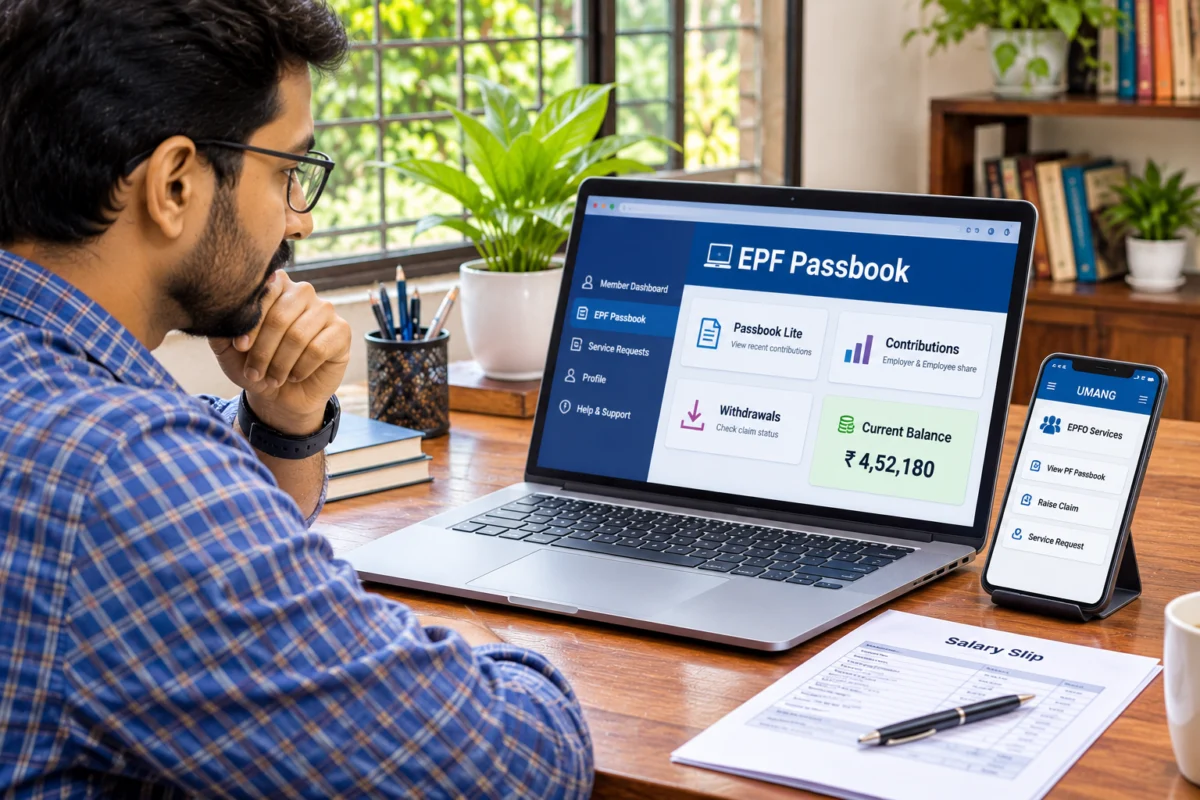
Employees who contribute to the Employees’ Provident Fund (EPF) can check their savings, employer contributions and account transactions online using their Universal Account Number (UAN). The Employees’ Provident Fund Organisation (EPFO) provides several ways to view this information, including the newer Passbook Lite facility inside the UAN Member Portal, the detailed EPF Passbook portal, the UMANG app, SMS and a missed-call service.
This guide explains how to check your EPF balance online, download a full PF passbook PDF, activate an inactive UAN, view accounts from previous employers and understand why a contribution may not appear immediately. It also explains an important exception: employees of establishments that manage their own exempted provident-fund trust may not see a regular passbook on the EPFO portal. The procedures below were checked against EPFO and Government of India information on 23 November 2026.
What is an EPF balance and what is a UAN?
The Employees’ Provident Fund is a retirement savings arrangement for eligible employees working in establishments covered by the EPF law. Contributions are made during employment and recorded against the member’s provident-fund account. The passbook provides a transaction view of the account, including contributions and withdrawals recorded by EPFO.
UAN stands for Universal Account Number. It is a permanent 12-digit identifier allotted to an EPFO member. When a person changes jobs, a new Member ID may be created by the new employer, but the existing UAN should normally continue to be used. This helps link multiple Member IDs and employment records under one member identity.
Your UAN is not the same as your PF Member ID. The UAN identifies you across employment, while a Member ID identifies a particular PF account connected with an establishment. When checking your passbook, you may see more than one Member ID if you have worked for multiple employers.
Ways to check your EPF balance online
| Method | What you can see | What you need |
|---|---|---|
| Passbook Lite | A convenient summary of contributions, withdrawals and balance within the UAN Member Portal. | Activated UAN, member-portal login and access to the registered mobile for any verification prompt. |
| Full EPF Passbook portal | Detailed Member ID-wise transaction history and PDF passbook download. | UAN and EPFO passbook login credentials. |
| UMANG app | EPFO services including PF balance, passbook viewing, claim and claim-status services. | UMANG account and the verification details requested by the app. |
| SMS | PF balance and selected account information sent to the registered mobile. | Activated UAN and the mobile number registered with EPFO. |
| Missed call | EPF account information through an automated response from EPFO. | Call from the mobile number registered with the UAN. |
Method 1: Check your EPF balance using Passbook Lite
EPFO introduced Passbook Lite inside the UAN Member Portal so members can view a summary of their provident-fund activity without first opening the separate passbook website. The facility is designed to make recent contributions, withdrawals and the balance easier to review through a single member login.
- Open the EPFO Member Portal. Visit unifiedportal-mem.epfindia.gov.in/memberinterface.
- Sign in using your UAN. Enter your 12-digit UAN and member-portal password, then complete the captcha or additional verification shown on the screen.
- Complete mobile verification if prompted. Enter the OTP sent to your registered mobile number. Follow the current portal instructions.
- Open the View menu. After login, locate the View option in the member dashboard.
- Select Passbook Lite. Open the Passbook Lite option to view the available summary of your EPF account.
- Review your account information. Check the contribution entries, withdrawals and displayed balance. If you have multiple Member IDs, select the relevant employment account where the portal provides that option.
- Open the detailed passbook when needed. For a more comprehensive transaction view, use the detailed passbook option or open the separate EPF Passbook portal.
Passbook Lite is useful when you only need a quick view of your PF activity. EPFO says that members can continue to use the separate Passbook Portal for a comprehensive view of passbook details, including its graphical display. The exact menu labels and login prompts may change as the member portal is updated.
Method 2: Download your full EPF passbook PDF
The full passbook is useful when you need to inspect month-wise contributions, check separate Member IDs or keep a detailed statement for your personal records. EPFO maintains a dedicated Member Passbook portal for this purpose.
- Open the official EPFO Passbook portal. Visit passbook.epfindia.gov.in.
- Enter your UAN. Type your 12-digit Universal Account Number in the UAN field.
- Enter your password. Use the password associated with your EPFO member login.
- Complete the captcha. Enter the characters displayed on the screen and select Sign In.
- Choose the Member ID. If your UAN is linked to multiple employment accounts, select the Member ID for the employer whose transactions you want to review.
- Open the passbook. Review the available contribution and withdrawal entries for the selected Member ID.
- Download the PDF. Use the download or PDF option provided by the portal and save the statement to a secure device.
Keep the downloaded file private because it contains employment and financial information. Do not upload your passbook to an unknown website that claims to calculate or release your PF money.
Method 3: Check PF balance through the UMANG app
UMANG is the Government of India’s mobile platform for accessing services from participating central and state departments. Its official service directory includes EPFO facilities for checking PF balance, viewing a passbook, raising claims, tracking claim status and registering grievances.
- Install the official UMANG app. Download it from the official app store on your smartphone or use the UMANG website.
- Register or sign in. Complete the mobile-number verification requested by UMANG.
- Find EPFO services. Search for EPFO in the app’s services section.
- Choose the employee service. Open the option for viewing a member passbook or checking PF balance.
- Enter the requested details. Follow the UAN, mobile or OTP instructions displayed in the service.
- View your account information. Select the relevant Member ID if the app provides more than one account and open the passbook or balance information.
- Save or review the statement. Use the download or share option only when it is provided by the official service and store the file securely.
The exact navigation can vary between UMANG versions and service updates. If the EPFO service menu changes, search for “EPFO” within the official UMANG app rather than following an old screenshot from an unofficial site.
Method 4: Check EPF balance through SMS
EPFO provides an SMS-based balance enquiry service for members with an activated UAN. Send the message from the mobile number registered with your EPFO account.
SMS format:
EPFOHO UAN LAN
Send the message to 7738299899.
Replace the word UAN with your 12-digit UAN and replace LAN with the applicable three-letter language code. For example, use ENG for English:
EPFOHO 123456789012 ENG
The number above is an illustrative placeholder, not a real member’s UAN. Check the format on EPFO’s official Passbook page before sending your message. The service is intended for an activated UAN and a mobile number registered with EPFO. Standard SMS charges from your mobile operator may apply.
Method 5: Check your PF balance through a missed call
EPFO also provides a missed-call facility for members who want to obtain basic PF account information without opening a website or app.
- Use the mobile number registered with your UAN.
- Give a missed call to 9966044425.
- Wait for the automated response or account information sent by EPFO.
- If no response arrives, confirm that the number is still linked to your UAN and use the Passbook Lite or full passbook method instead.
Do not call an alternative number sent by an unknown person claiming to help you check PF balance. The missed-call number above is displayed on EPFO’s official Passbook portal.
How to activate an inactive UAN
UAN activation has changed. EPFO’s current process uses Aadhaar-based Face Authentication Technology through the UMANG app. EPFO’s circular states that, from 1 August 2025, new UAN allotment/generation is to be done through this face-authentication process, subject to specified exceptions. Members who already have a UAN but have not activated it can also use UMANG.
What you need before starting
- Your 12-digit UAN, if one has already been allotted.
- A valid Aadhaar number.
- Access to the mobile number linked with Aadhaar for OTP verification.
- The Aadhaar Face RD app installed when required for face authentication.
- A smartphone with a working camera and internet connection.
Steps to activate an existing UAN through UMANG
- Open the official UMANG app and search for EPFO services.
- Open the UAN Services Through Face Authentication section.
- Select UAN Activation for an existing but inactive UAN.
- Enter your UAN, Aadhaar number and Aadhaar-linked mobile number.
- Provide the consent requested for Aadhaar authentication and request the OTP.
- Enter the OTP received on the Aadhaar-linked mobile number.
- Install or open Aadhaar Face RD if prompted.
- Follow the on-screen instructions and complete the face-authentication step.
- After successful validation, follow the confirmation and password instructions sent by the system.
For a person who does not yet have a UAN, choose the UAN Allotment and Activation option rather than UAN Activation. EPFO’s official manual explains the separate processes. Do not create another UAN simply because you have forgotten the existing number; first check with your employer or EPFO so duplicate member identities are not created.
Official instructions: EPFO User Manual for UAN Services on UMANG.
How to check PF accounts from previous employers
When you change jobs, the new employer may create a new Member ID linked to your existing UAN. Your previous employment account may therefore continue to appear separately in the passbook. It is important to review every Member ID rather than assuming that the latest employer’s account contains all earlier contributions.
- Sign in to the UAN Member Portal.
- Open the View or Service History section, where available, to see the establishments linked with your UAN.
- Check the Member ID and employment dates for each establishment.
- Open the full passbook for each relevant Member ID and review the contribution and withdrawal entries.
- If an earlier account is missing, ask the previous or current employer to check whether the Member ID was correctly linked to your UAN.
- Review your PF transfer status if you have submitted a transfer claim between employers.
EPFO explains that UAN acts as an umbrella for multiple Member IDs. Keeping the same UAN when changing jobs helps maintain continuity and makes it easier to view employment-related PF accounts.
What does an EPF passbook show?
A passbook is a transaction record for the selected Member ID. The information can include:
- Employee share: The employee’s contribution recorded in the PF account.
- Employer share: The part of the employer’s contribution credited to the EPF account under the applicable rules.
- EPS-related information: The employer’s contribution may be divided between EPF and the Employees’ Pension Scheme (EPS), depending on the applicable rules. The pension portion is not the same as a withdrawable EPF savings balance.
- Interest entries: Interest credited to the PF account as posted by EPFO.
- Withdrawals or advances: Amounts debited when an eligible claim or advance has been settled.
- Running balance: The account balance after the recorded transactions for the selected Member ID.
The employee’s and employer’s contribution entries should not be confused with the gross amount shown on a salary slip. The employer’s contribution is allocated under EPF and EPS rules, and the exact calculation can depend on wages, statutory ceilings, establishment coverage and other applicable conditions.
Why is the latest PF contribution not showing?
If a salary slip shows a PF deduction but the passbook has not yet displayed the matching contribution, first compare the wage month and the date on which the employer deposited the contribution. A missing entry does not automatically mean that the employer has not paid it, but it should be checked if it remains unresolved.
| Possible reason | What to do |
|---|---|
| Employer has not yet deposited or filed the monthly return | Ask the payroll or HR team for the remittance status and the wage month concerned. Compare it with your salary slip. |
| Contribution is still being processed or reflected | Check the passbook again later and compare the date of the employer’s remittance with the month shown in the statement. |
| Wrong Member ID or previous employment selected | Check all Member IDs linked to your UAN and open the account associated with the employer and wage month. |
| UAN or KYC details do not match | Ask the employer to review the member’s name, date of birth, Aadhaar and other records linked to the UAN. |
| Account belongs to an exempted establishment | Contact the employer-managed PF trust for its statement because the regular EPFO passbook may not be available. |
| Transfer or withdrawal transaction is pending | Check the claim or transfer status separately and compare the transaction against the relevant Member IDs. |
Keep salary slips, bank credit records, employer communications and passbook downloads. They help when asking the employer or EPFO to investigate a mismatch.
Why is my EPF passbook not available?
One important exception is an exempted establishment. Some organisations manage the provident fund through an exempted employer-run trust instead of maintaining the ordinary member passbook through EPFO. EPFO’s member FAQ states that if the PF is managed by the company itself under an exempted establishment, the passbook may not be available in the UAN portal. In that situation, contact the employer or trust to obtain the PF statement.
Other reasons can include an inactive UAN, incorrect login details, a recently created Member ID or a temporary portal issue. Check that the UAN is active, try the correct member portal and passbook portal, and ask your employer to confirm the establishment’s PF arrangement.
What to do if your PF balance or contribution appears incorrect
If the passbook still looks wrong after checking the Member ID and wage month, raise the issue with the employer or EPFO with a clear record of the discrepancy.
- Download the latest passbook PDF for the relevant Member ID.
- Collect salary slips for the months where the contribution appears missing or incorrect.
- Write down the employer name, Member ID, wage month and expected contribution from the salary record.
- Ask the employer’s payroll team to confirm the monthly PF return and payment details.
- If the issue is not resolved, register a grievance on the EPFiGMS portal.
- Choose PF Member as the grievance status when you have a UAN, enter the relevant details, attach supporting records and save the grievance registration number.
- Use the portal to check the response, upload further documents or send a reminder when required.
EPFiGMS is EPFO’s official grievance-management system. It allows members to register a complaint, receive an acknowledgement, view the status and submit a reminder for a pending grievance. The portal is also available through UMANG’s EPFO services.
Safety tips when checking EPF balance online
- Use only official EPFO websites and the official UMANG app.
- Never share your UAN password, Aadhaar OTP, bank PIN, card details or UPI PIN with a caller or message sender.
- EPFO warns members that it does not ask them to share personal or financial details through calls, messages or social media.
- Do not pay an agent who promises to release your PF balance or speed up a claim.
- Do not install remote-access apps or share your screen with an unknown person claiming to be an EPFO official.
- Sign out after checking your account, especially when using a shared or public computer.
- Store the downloaded passbook securely because it contains sensitive employment and financial information.
Be especially careful when starting a new job or sharing personal documents with a recruiter. Our guide on how to verify a genuine job offer in India explains how to check employers and protect personal information before onboarding.
Frequently asked questions about EPF balance and passbook
How can I check my EPF balance online?
You can use Passbook Lite in the UAN Member Portal, the full EPF Passbook portal or the UMANG app. EPFO also lists SMS and missed-call options for members with an activated UAN.
What is the official website to download an EPF passbook?
Use passbook.epfindia.gov.in. Sign in with your UAN and password, complete the captcha and select the relevant Member ID to view or download the detailed passbook.
What is Passbook Lite in EPFO?
Passbook Lite is a summary view inside the UAN Member Portal. It allows members to review contributions, withdrawals and the displayed balance through the member login. The separate Passbook Portal remains available for a more comprehensive passbook view.
Can I check PF balance without logging in?
Yes. EPFO lists an SMS service at 7738299899 and a missed-call service at 9966044425. These options require the mobile number registered with your EPFO account and an activated UAN.
What is the SMS format for checking EPF balance?
Send EPFOHO UAN LAN to 7738299899 from your registered mobile. Replace UAN with your 12-digit number and LAN with the appropriate three-letter language code.
What is the missed-call number for EPF balance?
Give a missed call to 9966044425 from the mobile number registered with your UAN.
How can I activate my UAN?
Use the UAN Services Through Face Authentication facility in UMANG. You need your UAN, Aadhaar, access to the Aadhaar-linked mobile number and the Aadhaar Face RD app for the face-authentication step.
Can I use the same UAN after changing jobs?
Yes. UAN is a permanent member identifier and should normally continue when you join another EPFO-covered employer. The new employer links the new Member ID with your existing UAN.
Why is my previous employer’s PF account not visible?
Check whether the previous Member ID is linked to your UAN. Ask the employer to correct the member linkage if necessary and review your service history and transfer status.
Why is my passbook unavailable even though I have a UAN?
If your establishment is exempted and manages PF through its own trust, the ordinary EPFO passbook may not be available. Contact the employer or trust for your PF statement.
Why is my employer’s contribution different from the amount on my salary slip?
The employer’s total contribution is distributed under EPF and EPS rules. The pension-scheme portion is not the same as the amount credited to the withdrawable EPF balance. Check the salary structure and the relevant passbook entries.
How can I complain if my PF contribution is missing?
First ask your employer to check the remittance and member details. If the issue is unresolved, use the official EPFiGMS grievance portal and attach salary slips, passbook records and relevant evidence.
Official EPFO and UMANG links
| Official resource | Purpose |
|---|---|
| EPFO UAN Member Portal | Member login, Passbook Lite and other UAN services. |
| EPFO Member Passbook | View detailed PF transactions and download the passbook PDF. |
| UMANG official website | Access EPFO services, including UAN activation and passbook facilities. |
| EPFO official website | Read EPFO notices, member guidance and official circulars. |
| EPFO UAN activation manual | Read the current UMANG face-authentication instructions for UAN generation and activation. |
| Government of India: UAN services through UMANG | Read the Ministry of Labour and Employment announcement about Aadhaar face authentication. |
| Government of India: Passbook Lite | Understand the Passbook Lite summary view and one-login member services. |
| EPFiGMS | Register and track grievances relating to EPFO services. |
Final thoughts
Checking your EPF balance is easier when you know which EPFO service to use. Passbook Lite is convenient for a quick summary inside the UAN Member Portal, while the detailed Passbook Portal is useful for checking transactions and keeping a PDF statement. UMANG, SMS and missed-call services provide additional ways to view account information. Keep your UAN active, review every Member ID linked to your employment history and compare the passbook with your salary records. If a contribution is missing or a balance appears incorrect, contact your employer and use EPFiGMS for an official grievance rather than relying on an unofficial agent.